

Wskazówki
TAK i NIE przy tworzeniu obrazków.
Treść i jakość | ||
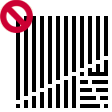 | 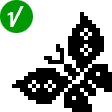 | Rozpoznawalny ObrazekObrazki muszą mieć sens. Rozrzucone kwadraty lub przypadkowe linie sprawiają, że obrazek nie jest interesujący. Zobacz przykład. |
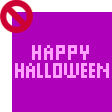 | 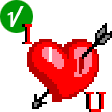 | TekstJeśli chcesz przekazać jakąś wiadomość, zrób to za pomocą obrazka, a nie samym tekstem. |
 |  | AlfabetSerie Alfabetów są akceptowane tylko, jeśli litery są dekoracyjne lub połączone z obrazkiem i docelowo są w kategorii Nauka angielskiego. |
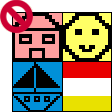 | 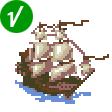 | ProstotaProste obrazki domów, emotikonów. łódek, kwiatów, itd. rzadko są akceptowane. Spróbuj dodać obrazkowi życia i sprawić, żeby był jedyny w swoim rodzaju. Flagi zazwyczaj składają się z 2 lub 3 kolorowych pasów i w związku z tym nie są prawdziwymi zagadkami. Ponieważ chcemy być sprawiedliwi, nie akceptujemy żadnych flag. |
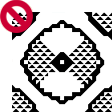 | 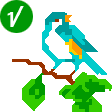 | TrójkątyUżyj trójkątów, aby "wygładzić" i upiększyć obrazek, a nie, jako "kolor" wypełniający większy obszar. Obrazki ze zbyt dużą liczbą trójkątów często źle się rozwiązuje. Zobacz przykład. |
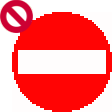 | 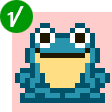 | SymetriaCałkowicie symetryczne obrazki są zbyt przewidywalne. Akceptujemy je tylko jeśli obrazek jest przeznaczony dla dzieci, do kategorii kiddlerów. Spróbuj wtedy stworzyć obrazek o niewielkim rozmiarze i o tematyce odpowiedniej dla dzieci. |
WrażliwośćObrazki rozwiązują ludzie z całego świata, również dzieci. Bądźcie dla siebie uprzejmi. Obraźliwe obrazki nie są akceptowane. Nie przyjmujemy również obrazków obscenicznych, politycznych i religijnych. | ||
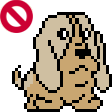 | 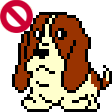 | DuplikatyTrudno wiedzieć jakie obrazki (zagadki) mamy już online. Najlepszym sposobem jest użyć Serie. Na przykład, jeśli chcesz stworzyć Pikachy, idź do Kreskówki i komiksy: Animacje: Anime i manga: Pokemon. Przeszukaj tytuły lub wyszukaj "pikachu". |
Sprawy techniczne | ||
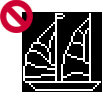 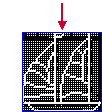 | 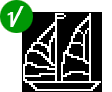 | Kolor tłaKolor tła definiuje puste kwadraty na obrazku. Zawsze wybierz dla tła kolor największego obszaru. Sprawi to, że obrazek będzie lepszy i rozwiązanie go będzie wymagało więcej logicznego myślenia. W przypadku Łodzi, głównym kolorem jest czarny. Kiedy wybierzemy czarny na kolor tła, warsztat wyprodukuje obrazek, który jest "beznadziejny" do zatwierdzenia. Jeśli wybierzemy biały, obrazek da się rozwiązać. Jednakże, jedną z zasad rozwiązywania biało-czarnych obrazków logicznych jest: "Pomiędzy dwoma wskazówkami jest co najmniej jeden pusty kwadrat (tło)". Dodaliśmy linie i kwadraty, aby obrazek dało się rozwiązać i rezultatem jest dobry obrazek logiczny. Zobacz przykład. |
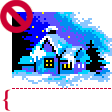 | 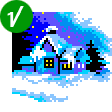 | PrzycinanieUsunięcie linii samego tła jest bardzo ważne. Jeśli zostawimy je, zamienią się na puste linie bez wskazówek w obrazku. Popatrzmy na obrazek Zimowa Sceneria (rozmiar 50x50). |
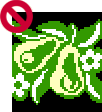 | 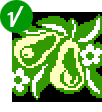 | Mało tła po przycięciuSpójrzmy na Pears (Gruszki). Najpierw usuwamy te linie. Ale po przycięciu warsztat ostrzega: "za mało koloru tła". Możemy dodać czerń w środku obrazka lub wybrać inny kolor tła. |
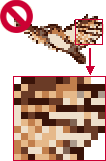 | 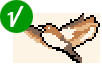 | ClearnessKiedy bierzemy kolorowy obrazek i używając programów graficznych zmniejszamy liczbę kolorów do 8, otrzymujemy zazwyczaj "zapaćkany" obrazek z wieloma jednopikselowymi kolorami. Każdy piksel zamienia się we wskazówkę, więc obrazek składa się z wielu wskazówek "1". Oryginalny obrazek Bird (Ptak) miał 256 kolorów. Zmniejszyliśmy liczbę kolorów do 8 i zrobiliśmy z niego obrazek logiczny. Zobacz przykład. Spójrz na 13tą kolumnę od prawej. Liczba wskazówek wynosi 21. Liczba pustych kwadratów to 25. Nudno rozwiązywać taką linię. Oczyściliśmy obrazek, użyliśmy tylko 5 kolorów i zmieniliśmy pojedyncze kwadraty w porządne linie i obszary kolorów. Wynikiem jest przyjemny do rozwiązywania obrazek. Zobacz przykład. |
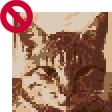 | 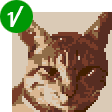 | In large grids, like the Cat, the need to clean the image is essential. If we don't do it, the puzzle will have many long lines of clues. Users may give up on solving that puzzle because it requires too much tedious work. View example: Left clue-lines | Top clue-lines |
MultiGriddlery | ||
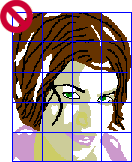 | 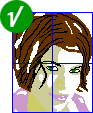 | Wielkość obrazkaPierwszym krokiem w tworzeniu MultiGriddlera jest znalezienie odpowiedniego rozmiaru obrazka. Jeśli obrazek jest duży i nie ma wielu szczegółów, części MultiGriddlera mają duże obszary zwykłego wypełnienia kolorem. Rozwiązujący muszą wtedy liczyć wiele kwadratów i rysować długie linie.
|
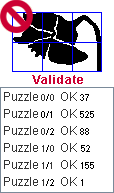 | 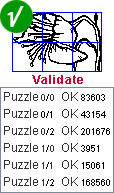 | Jakość obrazuRozwiązanie MultiGriddlera wymaga więcej czasu i wysiłku. Rozwiązujący oczekują rezultatu wartego włożonego weń wysiłku. Dobry sposobem na sprawdzenie jakości obrazka jest zaimportowanie go do Warsztatu i sprawdzenie. Jeśli większość części jest warte dość niewiele punktów, oznacza to, że obrazek ma niewiele detali i będzie mało interesujący. |
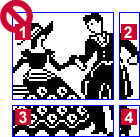 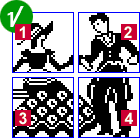 | Zbalansowane częściNajbardziej powszechnym błędem przy tworzeniu MultiGriddlerów jest rozdzielenie obrazka na niezbalansowane części. 1 - 50x50 Tylko 1. część jest prawdziwą łamigłówką. Części nr 2, 3 i 4 nie są interesujące do rozwiązania. | |
Przycinanie i równowagaUsunięcie nadmiernego tła wokół obrazka jest niezbędne. Weź pod uwagę, że po przycięciu warsztat ponownie dzieli części na 50x50. trzeba będzie zmienić rozmiar raz jeszcze, aby otrzymać równomierne części. | ||
Siatki będące wielokrotnością 5.MultiGriddlery są lepsze, jeśli rozmiar części jest wielokrotnością 5, np. części 30x35 są lepsze niż 29x34. | ||
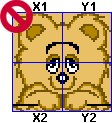 | 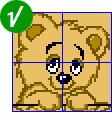 | Samo-dublowanie sięW MultiGriddlerach, jeśli obraz jest całkowicie symetryczny, rezultatem są zdublowane obrazki. Popatrzmy na obrazek Misia. |
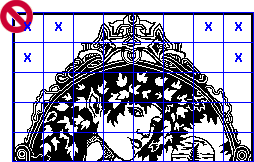 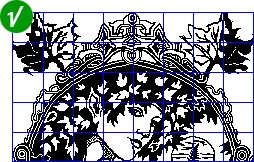 | RamkiPuste części to częsty problem przy tworzeniu MultiGriddlerów. CZasem wydaje się, że rozwiązaniem jest narysowanie ramki dookoła obrazka.  MultiGriddler nie zostanie zaakceptowany, gdyż otrzymamy 3 zdublowane obrazki. | |
Powodzenia! | ||